Introduction
This document helps developers integrate with Payorb – the Payorb payment platform.
Terminology:
- Payment Platform (PP) – The Payorb Payment system
- Merchant – Site integrating with Payorb
- API Key – Also called Secret Key, provided after successful onboarding. Used to generate the secure HMAC hash for API requests.
This integration has two parts:
- Payorb Pay APIs invoked by Merchant site:
- Create Order
- Create Payout Order
- Verify Order
- Merchant API implemented per Payorb Pay specification:
- Callback
Before development, register with PP, complete onboarding & KYC, and set payout limits. PP will provide a merchant ID and API key. Whitelist your IP for testing.
API calls use standard HTTPS POST (application/json). Provide these redirect URLs:
- →
{YOURDOMAIN}/success - →
{YOURDOMAIN}/pending - →
{YOURDOMAIN}/failed
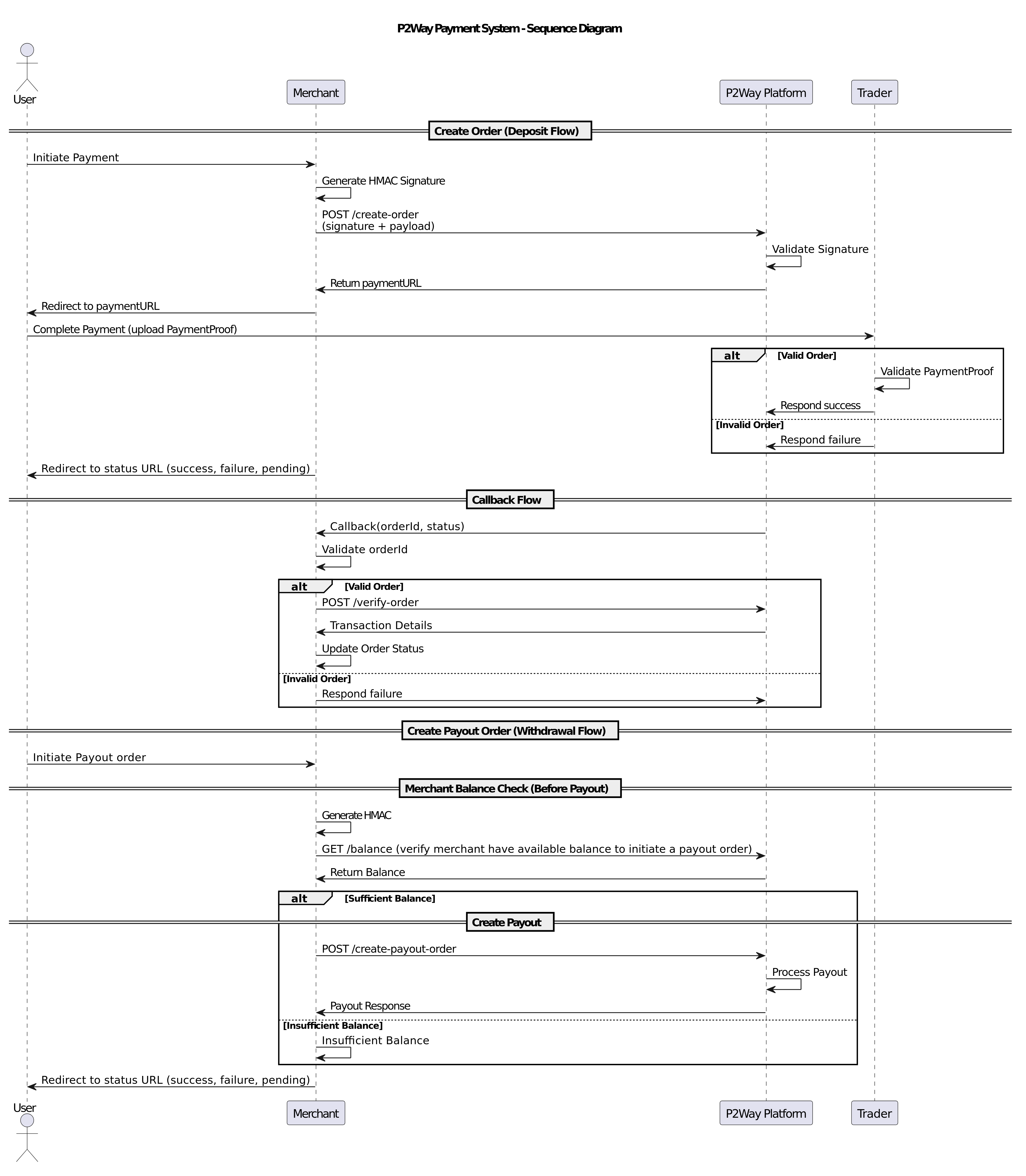
Flow Diagram
Authentication
Every API call requires a HmacSHA256 signature generated with your private key. The server generates its own HMAC and compares it with yours — mismatches are discarded. The signature is sent as an HTTP header named signature.
Example Java implementation:
POST create-order INR
Creates a payment order in the system and returns a payment URL to redirect the user. After payment completion or cancellation, the user is redirected to your callback URL, from which you can retrieve payment details via the Verify Order API.
payURL: Reach out to PP for the create-order URL
Headers
| signature | {generated Hash} |
|---|---|
| Content-Type | application/json |
| Accept | application/json |
Body (raw JSON)
| Parameter | Type | Required | Description |
|---|---|---|---|
| fname | String | Required | User first name |
| lname | String | Optional | User last name |
| address | String | Optional | User address |
| pin | String | Optional | PIN/postal code |
| city | String | Optional | City |
| mobile | String | Optional | Mobile number |
| state | String | Optional | State/province |
| String | Required | User email address |
| Parameter | Type | Required | Description |
|---|---|---|---|
| amount | Decimal | Required | Requested amount for creating order |
| merchantId | String | Required | Merchant ID provided by the platform |
| orderId | String | Required | Unique merchant-generated order ID |
| paymentMethod | String | Required | Payment method: UPI (INR), IPAY (LKR), EASYPAISA (PKR) |
| currency | String | Required | Currency code: INR / LKR / PKR |
| Parameter | Type | Required | Description |
|---|---|---|---|
| service | String | Optional | Type of service being requested |
| bankType | String | Optional | Type of bank |
Example Request
Example Response
POST create-payout-order INR
Generates a payout (withdrawal) order on the Payment Platform.
Note: Choose a bank from the Available Banks list. Choose a payment method from the Supported Payment Methods list.
Headers
| signature | {generated Hash} |
|---|---|
| Content-Type | application/json |
| Accept | application/json |
Body (raw JSON)
| Parameter | Type | Required | Description |
|---|---|---|---|
| accountNumber | String | Required | Account number to credit |
| ifscCode | String | Required | IFSC code of the account |
| amount | Decimal | Required | Requested payout amount |
| transactionType | String | Required | Must be PAY_OUT |
| bank | String | Required | Bank name from the available banks list |
| bnfNickName | String | Optional | Beneficiary nickname |
| payeeName | String | Required | Payee name (must match bank records) |
| orderId | String | Required | Unique merchant-generated order ID |
| phoneNumber | String | Required | User phone number |
| pinCode | String | Optional | PIN/postal code |
| emailId | String | Required | User email address |
| merchantId | String | Required | Merchant ID from the platform |
| paymentMethod | String | Required | NEFT / IMPS / UPI / BANK |
| currency | String | Required | Currency code (INR / LKR / PKR) |
Example Request
Example Response
POST verify-order
Reconfirms a successfully processed order and obtains further details on the order placed.
Headers
| signature | {generated Hash} |
|---|---|
| Content-Type | application/json |
| Accept | application/json |
Body (raw JSON)
| Parameter | Type | Required | Description |
|---|---|---|---|
| merchantId | String | Required | Merchant ID provided by the platform |
| merchantOrderId | String | Required | Unique order ID generated while creating order |
| orderId | String | Required | Unique order ID assigned by the platform |
| transactionUserUtr | String | Optional | Unique Transaction Reference ID |
Example Request
Example Response
GET callbackrequest
Implemented by the Merchant and called by PP to send order status. Upon success, the Merchant must call Verify Order to reconfirm and get full details. Respond with success: true/false per the response below.
Note: Consider the transaction's final status only after verify-order.
Query Parameters
| Parameter | Type | Required | Description |
|---|---|---|---|
| orderId | String | Required | Merchant order ID |
| status | String | Required | Transaction status (SUCCESS, FAILURE, PENDING) |
| tt (transactionType) | String | Required | PAY_IN or PAY_OUT |
Example Request
Expected Response
GET balance
Verifies the available merchant balance before initiating a payout.
Headers
| signature | {generated Hash} (SECRETKEY + merchantId + currency) |
|---|---|
| Content-Type | application/json |
| Accept | application/json |
| Parameter | Type | Required | Description |
|---|---|---|---|
| merchantId | String | Required | Merchant ID from the platform |
| currency | String | Required | Currency code for balance inquiry |
Example Request
Example Response
Error Codes
| HTTP Status | Code | Error Message |
|---|---|---|
| 200 | – | Merchant Not Found |
| 200 | – | Merchant Wallet not created |
| 200 | – | Hash Mismatched |
| 200 | – | Invalid Parameter |
| 401 | – | Unauthorized – Invalid or missing signature |
| 400 | – | Bad Request – Malformed JSON body |
| 500 | – | Internal Server Error |
Available Banks (INR)
- Canara Bank
- DCB Bank
- Federal Bank
- HDFC Bank
- Punjab National Bank
- Indian Bank
- ICICI Bank
- Syndicate Bank
- Karur Vysya Bank
- Union Bank of India
- Kotak Mahindra Bank
- IDFC First Bank
- Andhra Bank
- Karnataka Bank
- ICICI Corporate Bank
- Axis Bank
- UCO Bank
- South Indian Bank
- Yes Bank
- Standard Chartered Bank
- State Bank of India
- Indian Overseas Bank
- Bandhan Bank
- Central Bank of India
- Bank of Baroda
- UPI
Supported Payment Methods (INR)
- UPI
- NEFT
- IMPS
- BANK
Payorb API Documentation · Confidential